 Early access
SmartFACT Data
SmartFACT Data, including ConfigSheets, maintains reviewed reference tables and prepares files for agreed receiving workflows. It is in early access.
 GuidBenchBY SMARTFACT
FREE GUID AND UUID GENERATOR
Updated
Bulk UUID generation creates a set of identifiers in one operation. GuidBench generates up to 10,000 UUID v4 or v7 values in your browser, then copies or downloads the same set in the format you choose.
Free to use. No account, email address or trial. Your identifiers stay in your browser.
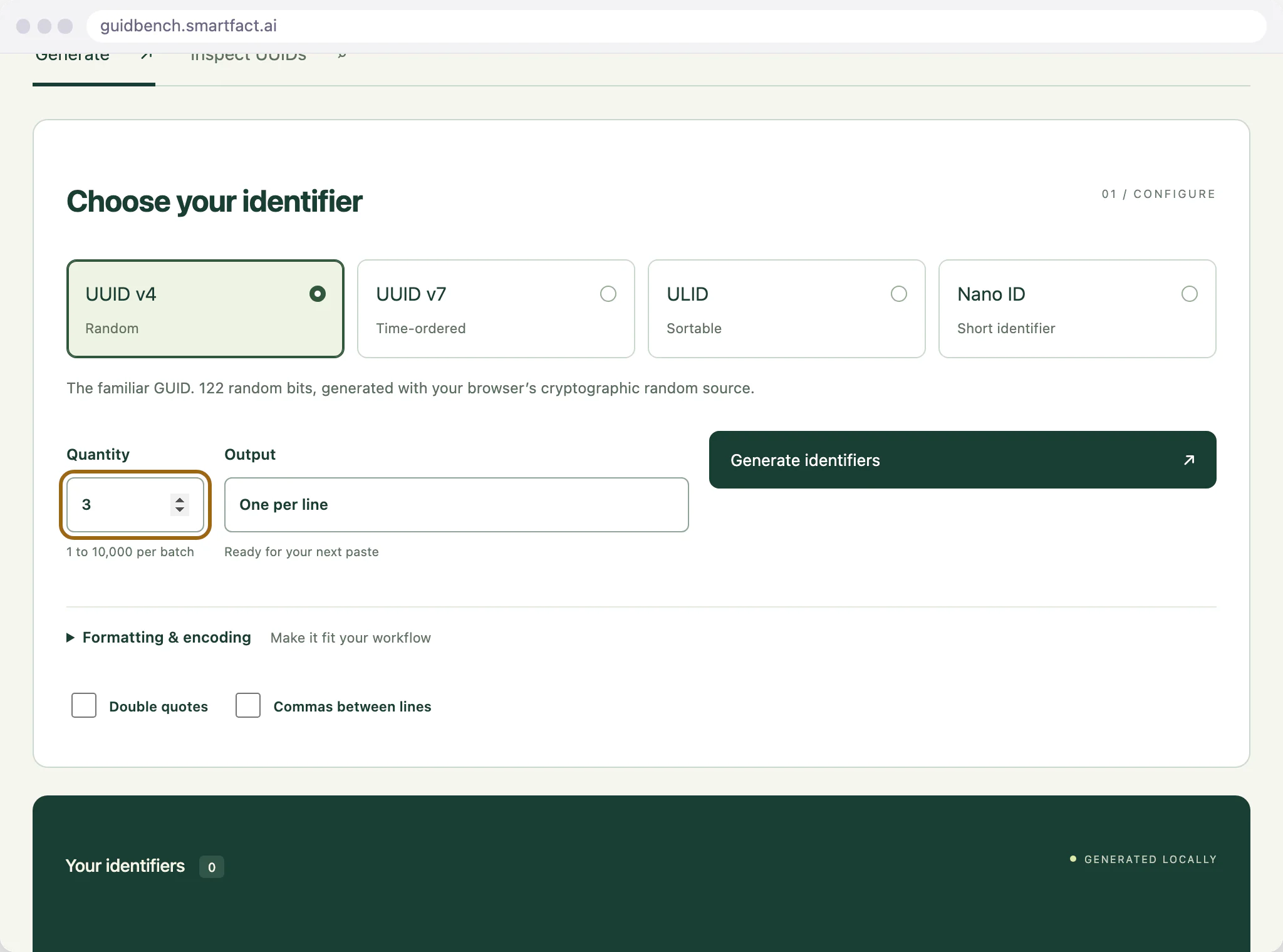
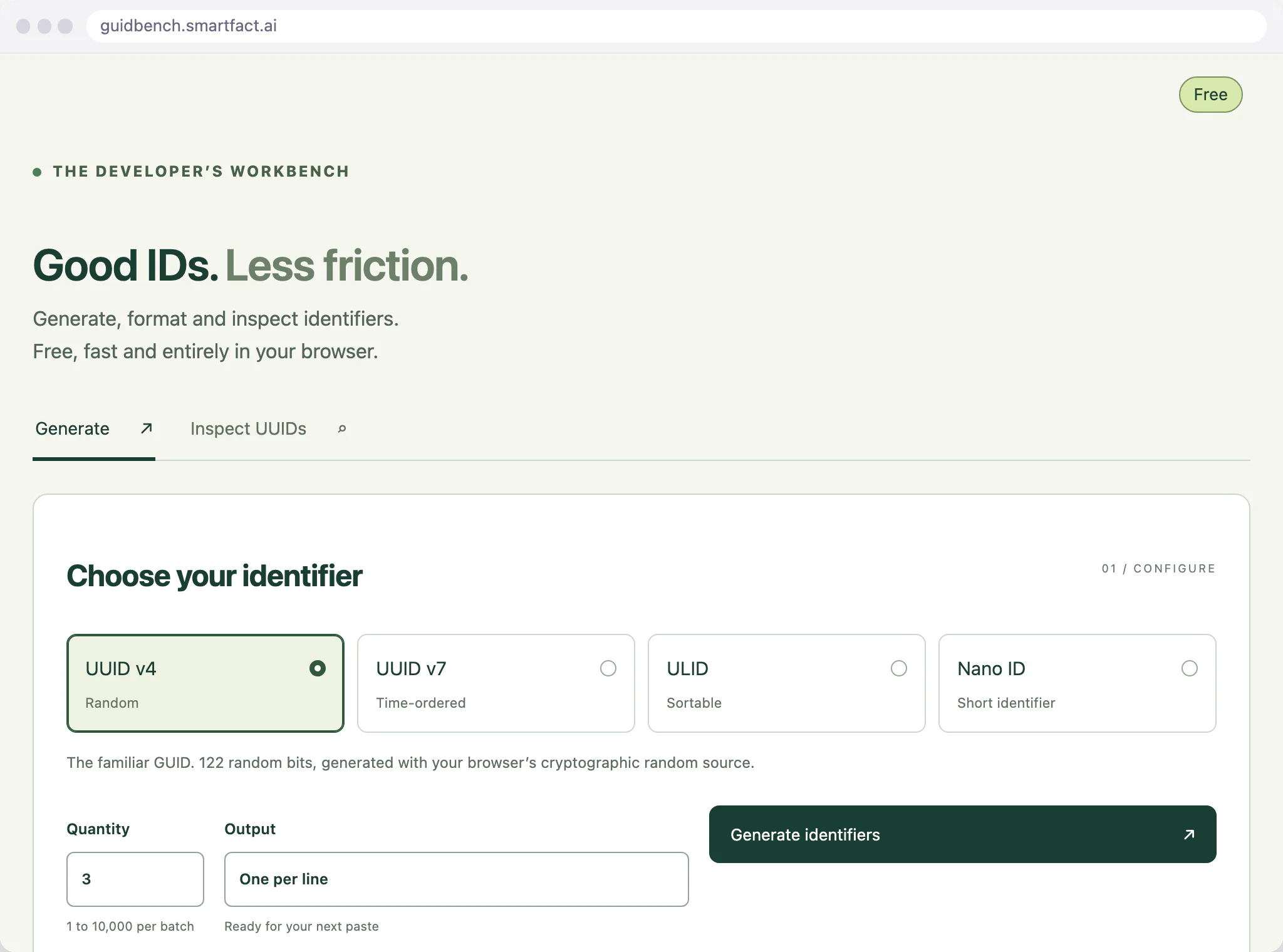
Choose random UUID v4 or timestamp-bearing UUID v7, then set a quantity from 1 to 10,000. Start with three values when checking your output format. Generation uses the browser’s cryptographic random source.
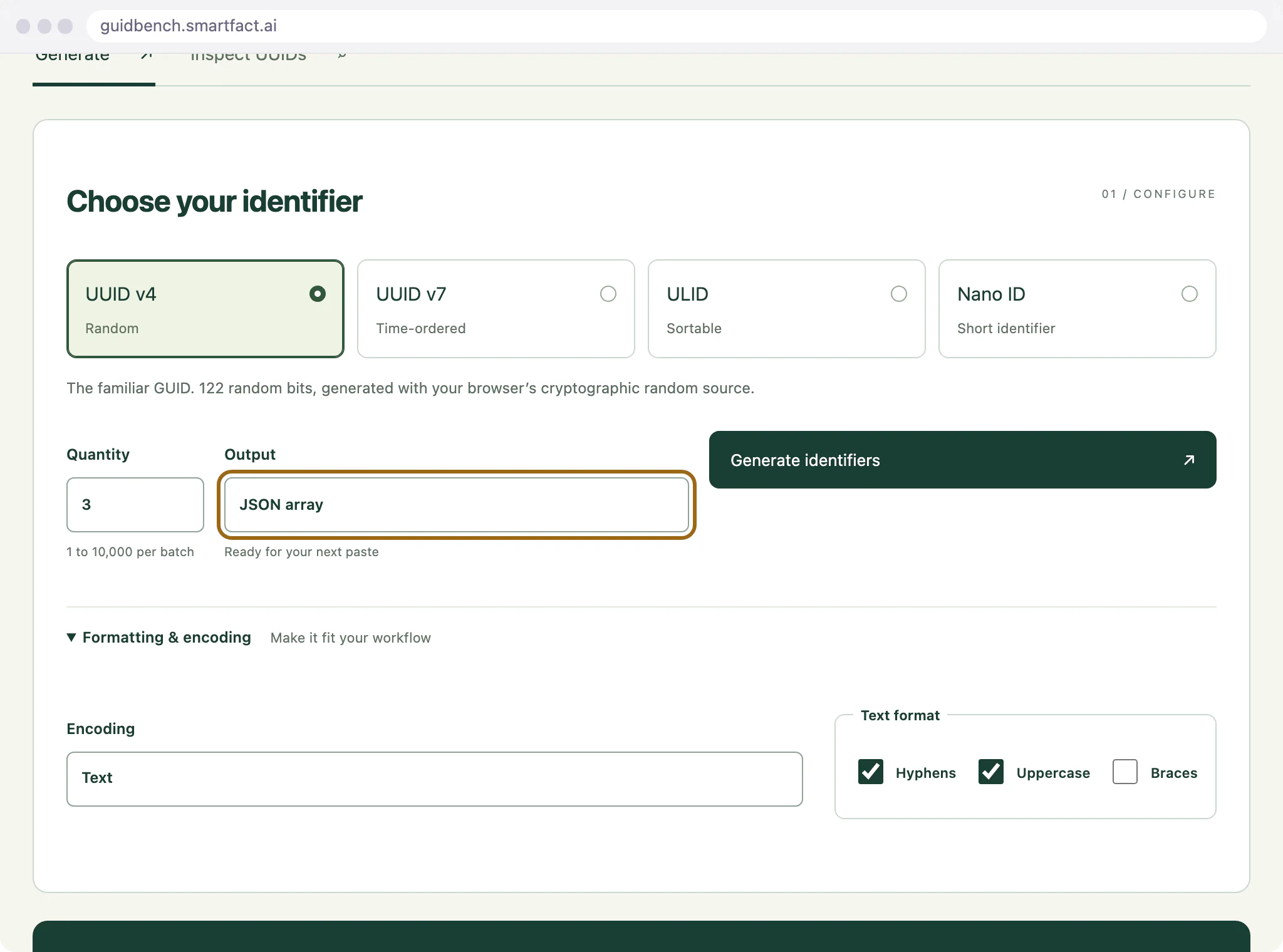
After Generate, change case, braces or hyphens without replacing the values. A compact UUID is the same 128-bit value written as 32 hexadecimal digits. Pressing Generate again creates a new batch.
Choose one value per line, a JSON array, a SQL IN list or a C# string array. These are formatted values, not commands run against a database. Copy or download the batch explicitly before closing the tab.
Random identifiers can collide. Use the right identifier size and a unique constraint where your system requires one. Neither generation nor a structure check proves that a value is globally unique, and an identifier is not a password.
For developers, integrators and people checking exact values before using them in another system.
A USEFUL STARTING POINT
Preparing records often means changing separators, letter case or list syntax. Generate once and choose the output your receiving tool expects, keeping the values themselves consistent.
FROM QUESTION TO EVIDENCE
Select UUID v4 or v7 and a batch size.
Create the values once, then adjust their presentation.
Copy or download the same batch in your chosen format.
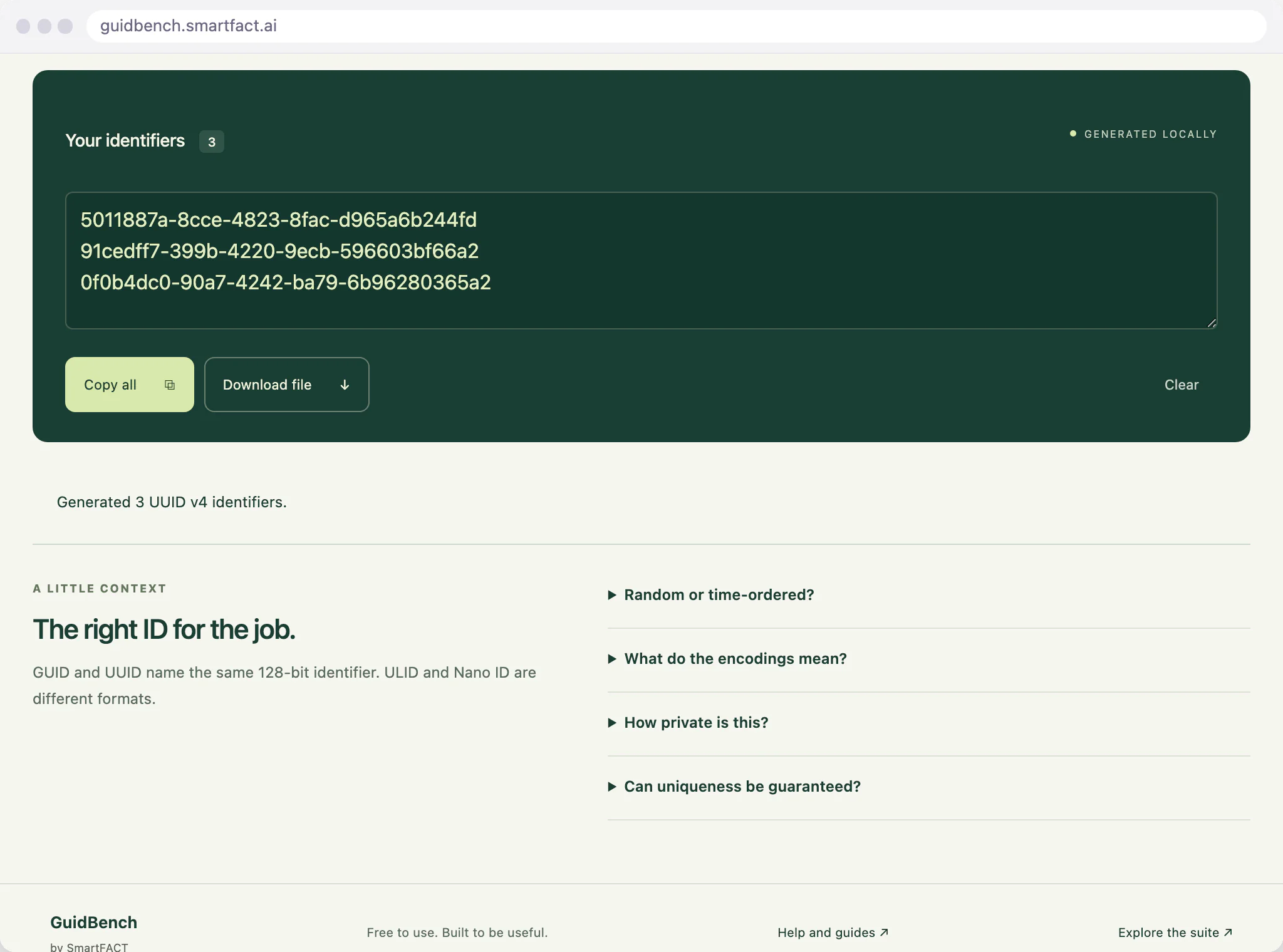
Choose three UUID v4 values, generate once and switch to JSON. The array contains the same three values. Changing their case does not create three replacement identifiers.
WHEN IDENTIFIERS JOIN YOUR WORKFLOW
GuidBench creates identifiers when you ask. These SmartFACT products help with the records and labels that use them.
Early accessSmartFACT Data, including ConfigSheets, maintains reviewed reference tables and prepares files for agreed receiving workflows. It is in early access.
 Invited trial
LabelRules turns label requirements described in plain English into approved rules that select and check labels for each job. It starts with an invited trial.
BEFORE YOU START
No. Formatting and output choices retain the current batch. Generate starts a new one.
From 1 to 10,000 in one batch.
No. Collision risk depends on the format and how it is generated and used. Enforce uniqueness in the receiving system where required.
No. A compact UUID removes hyphens from UUID text. Nano ID is a separate case-sensitive format.
The generator supports UUID v4 and v7, ULID and Nano ID, not every UUID version. Nano ID length is 8 to 64 characters. UUID v7 uses a fresh random suffix for every ID by default, with no guaranteed order inside a millisecond. Its optional sequential mode keeps one timestamp and increments a random starting suffix across the whole set; each Generate starts a fresh set, with no guaranteed order between sets. ULID retains order within one tab, not across devices or tabs. UUID structure checks do not prove uniqueness, origin, secure generation or application suitability. The inspector accepts canonical, compact, braced and UUID URN text, with a maximum of 100,000 characters. It does not silently remove spaces or decode Base64. A compact UUID is 32 hexadecimal digits without hyphens; Nano ID and ULID are separate identifier formats. Possible other formats get explanatory hints, not a UUID validation result. Identifiers are not passwords or access tokens.
Generated identifiers and inspector input stay in this tab’s memory. Refreshing or closing the tab discards them. Copy writes to your clipboard; download creates a local file. The tool has no analytics or saved identifier history. These public pages offer optional analytics separately, under Analytics settings. Ordinary page and catalogue requests may be logged by the hosting provider. No identifier is placed in a URL or sent to SmartFACT.
ONE SMALL JOB, DONE WELL
Open the free tool and start with one known example.
THE SMARTFACT SUITE
Automate factory decisions with rules you describe in plain English. Explore focused SmartFACT services, plus free tools for everyday checks.
Early accessSuggested next stepMaintain reference tables with ConfigSheets or bring shop orders into SmartFACT through reviewed connectors. Check changes and deliver data to the products that use it.
Explore SmartFACT Data ↗Invited trialDescribe label rules in plain English. Automatically select layouts, resolve customer codes and check each job before printing.
Explore LabelRules ↗ Early access
Turn plain English component rules into automatic kit checklists, then check scans against the expected parts and quantities.
Explore KitProof ↗ Early access
Turn plain English rules into automatic step selection for each unit, with required evidence and a record of completed work.
Explore WorkSteps ↗ Early access
Apply approved product rules and calculations automatically to turn dimensions and options into manufacturing requirements.
Register early-access interest ↗ Early access
Turn plain English rules into automatic order checks and destination selection, with controlled production release.
Register early-access interest ↗ Early access
Scan the work order and the parcel choice to book the courier and print the labels. Approved plain English rules recommend or choose the parcel.
Explore ParcelOffice ↗ Early access
Scan an empty container to send the right refill request to stores. Approved plain English rules set the stores queue, priority, ticket printer and escalation.
Explore RefillFlow ↗ Early access
Label each offcut, find a suitable length before cutting new stock and record what you used. Approved plain English rules decide what to keep and where it goes.
Explore RemnantRack ↗ Invited trial
Check a shared tool before handover, record who has it and keep damaged or overdue tools out of the next issue. Explore an invited trial for one factory crib.
Explore ToolCustody ↗ Invited trial
Receive, put away, reserve and issue stores material with barcode checks, keeping held, reserved and available stock apart. Explore an invited trial for one stockroom.
Explore StoresFlow ↗ Invited trial
Follow a lot or serial number through the records your factory already keeps, with the source of each link and the gaps shown. Explore an invited trial with two declared sources.
Explore LotTrail ↗ Early access
Scan an identified unit to get its approved final-inspection checks, then record exact readings with their result, holds and release history.
Register early-access interest ↗ Invited trial
Book returned units in, recover and label the usable parts, release them independently and record the unit each goes into. Explore an invited trial for one product family.
Explore ReclaimStation ↗ Free tool
See the text and key events your keyboard scanner sends. Compare them with the value you expected.
Test a scanner ↗ Free tool
Print a known PDF, measure its reference marks and compare scans from the printed codes.
Check a print ↗ Free tool
Create 100 × 50 mm bin and rack cards with Code 128 or QR, from one record or a CSV.
Make bin cards ↗ Free tool
Count stock by location with a barcode scanner, compare it with a stock file and export the results. No account needed.
Start a free count ↗ Free tool
See exactly what a scanned barcode contains, with hidden characters shown and GS1 fields, check digits and dates explained. No account needed.
Inspect a barcode ↗ Free tool
Scan a reference and each label, see an exact match or the first difference, and download the results. No account needed.
Start a free comparison ↗ Free tool
Scan an item or location, note what needs attention, print a review tag and keep a review list. No account needed.
Make a free tag ↗ Free tool
Load your own parts and locations CSV, scan a code and see every location it lists. No account needed.
Start a free lookup ↗ Free tool
Check cartons, pallets or serial numbers against a list with a phone or scanner and see what is missing. No account needed.
Start a free check ↗ Free tool
Check CSV and JSON files exactly as written, preview a column mapping and compare two versions by key. No account needed.
Check a file free ↗ Free tool
Time work cycles and changeovers on a phone, record interruptions with reasons and download the results. No account needed.
Start a free study ↗ Free tool
Label the offcuts on your rack, find a piece long enough before cutting new stock and record what you used. No account needed.
Track offcuts free ↗ Free tool
Load one or two CSV exports and follow a lot or serial forwards or backwards, with the row behind every link. No account needed.
Start a free trace ↗ Free tool
Record the parts recovered from each return, label them with a QR code, check them and record the unit each one goes into. No account needed.
Track recovered parts free ↗Free toolGenerate GUIDs, UUID v4 and v7, ULIDs and Nano IDs, format and download batches, or inspect a UUID in your browser. No account needed.
You are here Free tool
Inspect and edit text, hex, Base64 and binary bytes in your browser, reveal hidden characters and compare byte sequences. No account needed.
Inspect some bytes ↗ Free tool
Test JavaScript regular expressions in your browser, inspect matches and captures, preview replacements and check expected cases. No account needed.
Test a pattern ↗ Help
HelpStep-by-step guides and interactive demonstrations for the SmartFACT suite. Read the instructions, watch a task or practise with real product screens and sample data.
Open SmartFACT Help ↗